

Pro: branding, reports and groups
Last updated October 13, 2026
Pro is for IT techs and small shops who help a lot of people. You get your branding, session reports, unlimited people in groups, and file transfer.
Your business name and logo
The person you help sees your name and logo before they share, with your verified email under it.
- In the console, open Settings > Business tools > Your branding. In the apps: Business name and logo or Your business.
- Type your business name and choose Save name.
- Choose Choose a logo (PNG, JPG, SVG or WebP, up to 2 MB, at least 128 pixels).
- Pick Remove background or Keep as badge, check both previews under What they see, then Save logo.
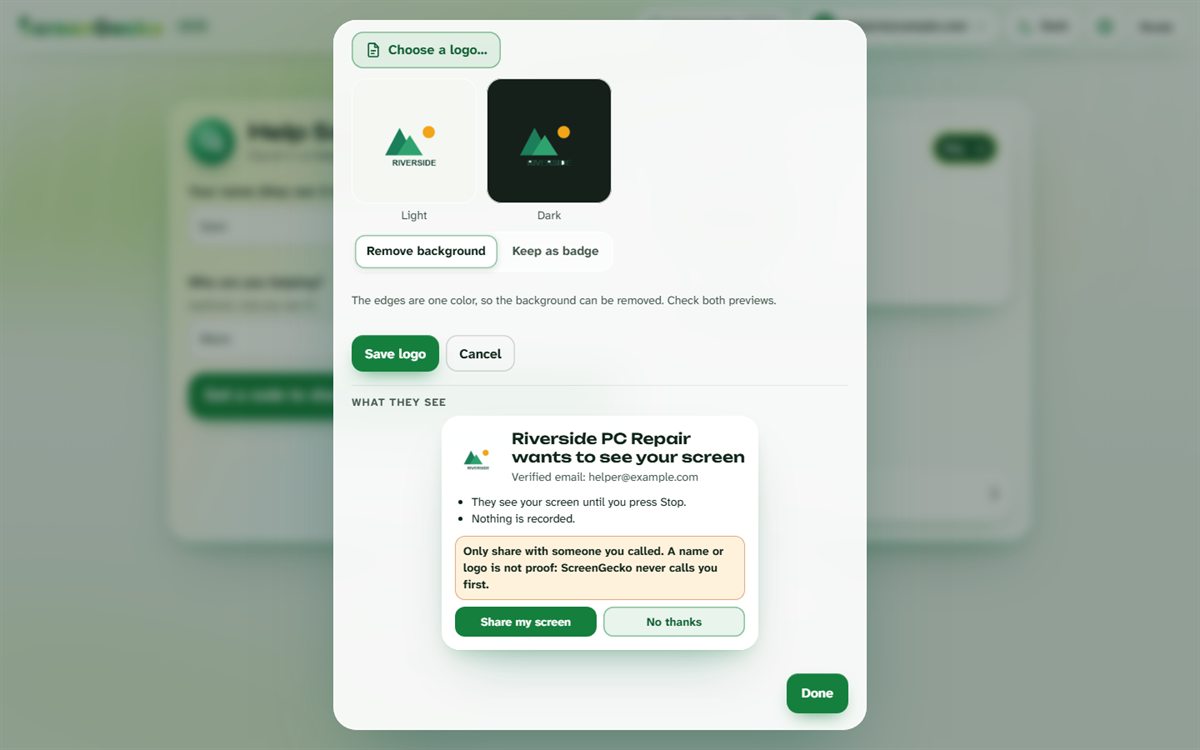
Well-known company and bank names cannot be used, and every screen still says: a name or logo is not proof, only share with someone you called.
Session notes and reports
- During a session, open the Notes tab (or Notes in the dock) and type. Notes save as you go.
- When the session ends, the Session report card has Download PDF and Email to. Email sends to up to 3 addresses; replies come to you.
- Find older reports under Past sessions on the start screen or in Settings. Open or Delete each one.
A report lists the device, the times, what you did, guides and file names, and your notes. It never contains pictures of their screen.
Unlimited people, in groups
- Open People I help and choose Manage groups.
- Choose Add group, for example "Front desk" or "Smith family". You can Rename or Delete groups later.
- Pick a group next to each person. Filter the list by group, or search by name or device.
File transfer
Send files to the device you help, and receive files from it. See Send a file.
Still need help?
Email support@screengecko.app. Tell us which device you use and what happened. We never need your password or a code, and we will never ask for them.