

Talk, camera and files
Last updated October 13, 2026
Talk while you help, show something with the camera, and send a file. Each one starts only when the person on that device says yes.
Talk
Talk is a voice call inside ScreenGecko, so you do not need a phone call too. Nothing is recorded.
- Helper: choose Talk in the dock (or press T). Your browser asks to use your microphone the first time.
- Person being helped: you see that your helper wants to talk. Your microphone stays off unless you tap Talk. Tap Not now to skip it.
- Tap Stop talking (or Talk off) to end the call. The session keeps going.
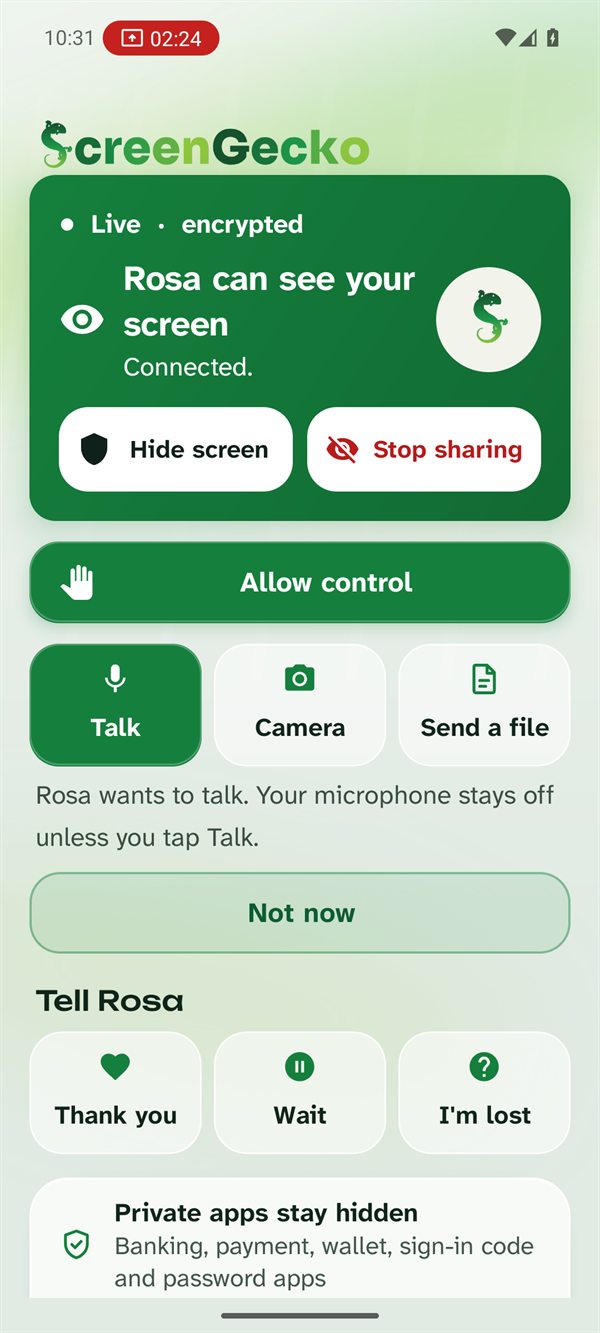
- Talk works when the helper uses the web console (screengecko.app/app, or the Windows app) or the Mac app. Helping from an Android phone or iPhone? Call them instead.
- It works with Android phones, Macs and Windows PCs being helped. iPhones and iPads do not have Talk.
Show with the camera Android
Sometimes the problem is not on the screen: a router light, a TV menu, a letter. The person being helped can show it with the phone camera.
- On the sharing screen, tap Camera. (Or, before sharing, tap Show with camera instead.)
- Point the phone at the thing. Use Light on and Use front camera or Use back camera if needed.
- Tap Back to screen share or Stop when you are done.
Helper: choose Freeze to hold the picture still while you look, then point or draw on it.
Send a file
File transfer comes with the helper's Pro plan. It works both ways, and the other side always chooses whether to take the file.
- Choose File in the console dock, or tap Send a file on the device being helped, and pick the file.
- The other side sees the offer and chooses Accept and save (in the console: Accept and download) or Decline.
- Saved files go to Downloads (on a Mac: Downloads > ScreenGecko). On Android you can then Open or Share it.
On Free or Family, the File button explains that file transfer comes with Pro. See Plans and billing.
Still need help?
Email support@screengecko.app. Tell us which device you use and what happened. We never need your password or a code, and we will never ask for them.