

The helper console tools
Last updated October 13, 2026
The helper console at screengecko.app/app (and in the Windows app) has everything in one dock, next to their screen. Here is what each part does.
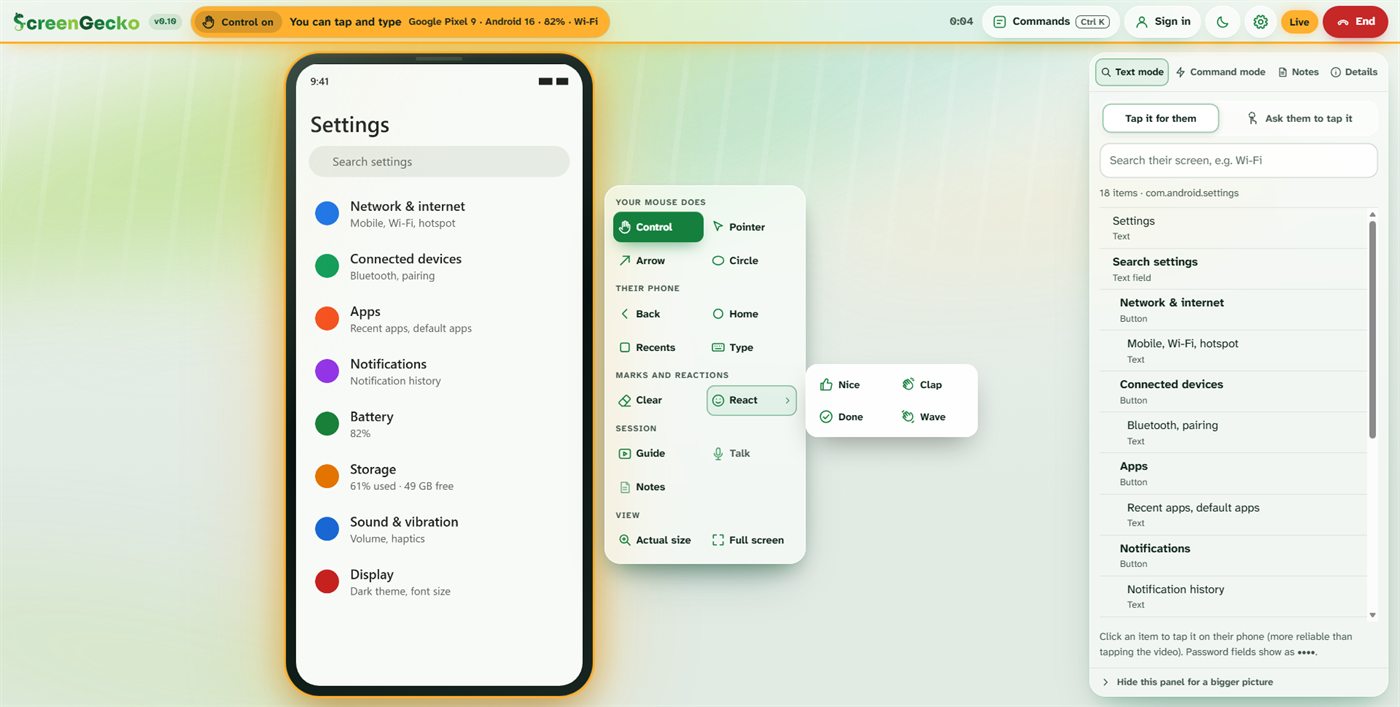
The dock
- Ask for control (Android, while control is off): asks them to tap Allow. See Allow control.
- Your mouse does: Control, Pointer, Arrow, Circle (keys 1 to 4).
- Their phone: Back, Home, Recents, Type (sends text into the field they selected).
- Marks and reactions: Clear (C) removes your drawings; React sends Nice, Clap, Done or Wave; Freeze appears while their camera is showing.
- Session: File, Guide (G), Talk (T), Notes.
- View: Actual size (Z) and Full screen (F).
The side panel tabs
- Text mode: a list of what is on their screen, once they allow control. Search it (for example "Wi-Fi") and click an item: Tap it for them, or Ask them to tap it. Password fields show as dots.
- Command mode: type a path like Settings > Network & internet, then Do it or Guide them. Tick One step at a time to go slowly, and Save as macro for paths you use often.
- Notes: notes for this session, saved as you type. Pro turns them into a report. See Pro tools.
- Details: control, what is shown, video and Talk status, People I help (to save this person), device health, and the event log.
Want a bigger picture? Choose Hide this panel for a bigger picture, and Show panel to bring it back. When you help a Mac or PC, the panel starts hidden.
Commands and full screen
- Commands (Ctrl+K, or Cmd+K on a Mac) finds any action by name, including End session.
- Full screen fills your screen with theirs. Press Esc to leave full screen.
- On a small screen, More opens Commands.
Ending
Choose End at the top right. Clicking the ScreenGecko logo asks first: Stay in the session or End and go home. After the session you get a summary to Copy or Download.
Still need help?
Email support@screengecko.app. Tell us which device you use and what happened. We never need your password or a code, and we will never ask for them.